
Creating Interfaces for Games and Applications: Design & Development
How we create graphical interfaces and why they matter
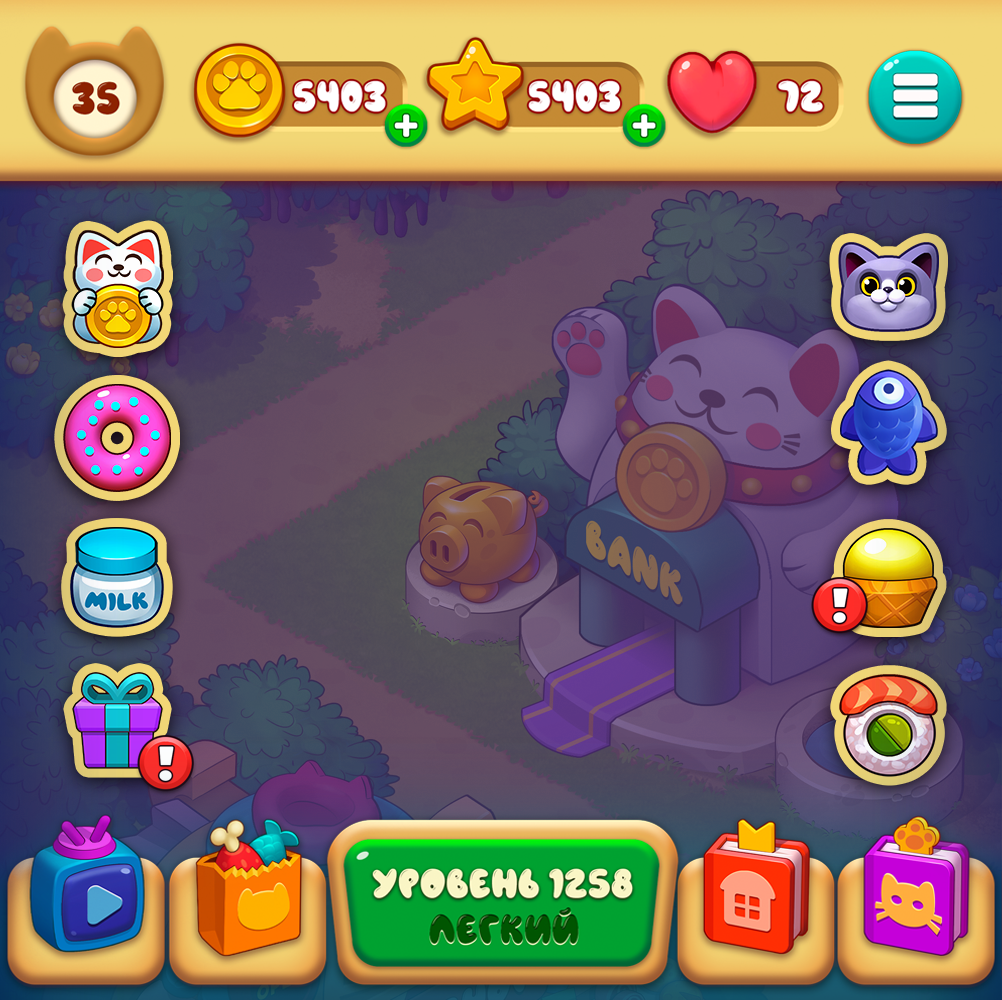
UI/UX in Gamedev
Developing a game interface (UI — User Interface) and user experience (UX — User Experience) is a huge and critically important part of game development. Poor UI can ruin even the most brilliant game. So, shall we dive in?
From Idea to Integration
How a Mobile Game Interface is Created
The game UI is everything that stands between the player and the game world: buttons, menus, health bars, indicators, maps. Its main goal is to be clear, instantly readable, and unobtrusive.
The process consists of several key stages.
Design and Prototyping: The “What” and “Why”
This is the most important stage — invisible to the players.
We analyze the gameplay to understand what information and actions the player needs at each moment. For example, in a fighting game, health and super-attack bars are essential. In a strategy game, resources and a mini-map are key. We create UX scenarios and outline every user path.
Next, we build the information architecture — deciding where and how each UI element will be placed. What is primary, and what is secondary. Screens are prototyped, sometimes in black-and-white sketches. Tools like Figma, Adobe XD, Sketch, or even paper, help at this stage. The goal here is to set priorities, logical blocks, and flows without worrying about visual design.
Visual Design: The “How”
Now the interface takes on style and color.
UI should be part of the game world and consistent with the game’s visual style.
When creating a UI Kit (library of reusable elements), the designer produces:
UI Animation: Bringing It to Life
Static UI is boring. Animation makes it responsive and pleasant.
Micro-animations:
Functional animations:
These animations aren’t just visually appealing — they provide clear visual feedback to the player.
Technical Implementation and Integration
Once the design is ready, it needs to be integrated into the game.
Testing and Iteration
No interface is perfect on the first try.
We start by testing with unprepared users and check:
Metrics are collected. Analytics may show, for example, that 80% of players can’t find a secret button in the settings. Based on this feedback, designers and developers make adjustments to improve usability.
Key Principles of Good Game UI/UX
The Bottom Line
Developing a game interface is a constant balance between aesthetics, functionality, and performance. It’s a dialogue with the player, anticipating their questions and providing clear, fast answers — without distracting from what matters most: the gameplay.
The game UI is everything that stands between the player and the game world: buttons, menus, health bars, indicators, maps. Its main goal is to be clear, instantly readable, and unobtrusive.
The process consists of several key stages.
Design and Prototyping: The “What” and “Why”
This is the most important stage — invisible to the players.
We analyze the gameplay to understand what information and actions the player needs at each moment. For example, in a fighting game, health and super-attack bars are essential. In a strategy game, resources and a mini-map are key. We create UX scenarios and outline every user path.
Next, we build the information architecture — deciding where and how each UI element will be placed. What is primary, and what is secondary. Screens are prototyped, sometimes in black-and-white sketches. Tools like Figma, Adobe XD, Sketch, or even paper, help at this stage. The goal here is to set priorities, logical blocks, and flows without worrying about visual design.
Visual Design: The “How”
Now the interface takes on style and color.
UI should be part of the game world and consistent with the game’s visual style.
- In a sci-fi shooter, we might use metallic panels, neon lighting, and techno fonts.
- In a fairy-tale RPG, we would use vintage frames, parchment textures, and handwritten fonts.
When creating a UI Kit (library of reusable elements), the designer produces:
- Buttons (normal, pressed, disabled)
- Icons (intuitive, clean, without unnecessary details)
- Bars (health, mana, experience)
- Fonts (legible even on small screens)
- Panels, backgrounds, frames
UI Animation: Bringing It to Life
Static UI is boring. Animation makes it responsive and pleasant.
Micro-animations:
- Buttons slightly “press down” when tapped
- Icons “bounce” to draw attention (e.g., a new quest)
- Smooth appearance and disappearance of menus
Functional animations:
- Health bar gradually filling
- Coin flying to the counter after a reward is collected
These animations aren’t just visually appealing — they provide clear visual feedback to the player.
Technical Implementation and Integration
Once the design is ready, it needs to be integrated into the game.
- Asset slicing (sprites): The designer exports all UI elements as separate PNG files. Often, they are combined into a texture atlas for optimization.
Testing and Iteration
No interface is perfect on the first try.
We start by testing with unprepared users and check:
- Can they find the necessary buttons?
- Do they understand what the icons mean?
- Do they get lost in menus?
Metrics are collected. Analytics may show, for example, that 80% of players can’t find a secret button in the settings. Based on this feedback, designers and developers make adjustments to improve usability.
Key Principles of Good Game UI/UX
- Clarity: The player should always understand what’s happening.
- Responsiveness: Every player action should trigger instant visual or audio feedback.
- Efficiency: Convey maximum information with minimal means.
- Non-intrusiveness: The best UI is one you barely notice because it works intuitively.
The Bottom Line
Developing a game interface is a constant balance between aesthetics, functionality, and performance. It’s a dialogue with the player, anticipating their questions and providing clear, fast answers — without distracting from what matters most: the gameplay.
